See plans

Plans

IPTV subscription plans: four passes, each paid once with a written end date

Our IPTV subscription plans turn on two questions: for how many months do you want the picture, anywhere between 3 months and 24 months, and do two TVs ever need to play side by side? Whichever you pick, you pay a single time, the login lands within 2 minutes and its last day is written into that same message. Nothing carries on unless you come back and order.

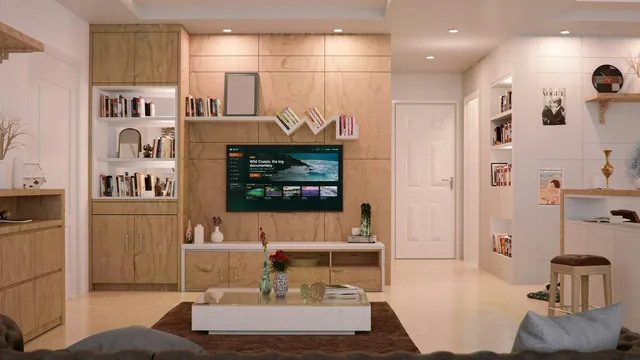
Bright living room, the TV on the wall unit showing the home page of an IPTV player

The passes

Pick a length, then the number of screens

Most homes are well served by Pass 12: £49 once, £4.08 a month, around 13p a day. The other three exist for a shorter first look, a second television and a two-year stretch.

Short pass

Pass 3: 3 months

Three months to get comfortable

£29.00

Works out at £9.67 each month

Three months, then decide

One screen playing at a time

  • 40,000+ channels, UK categories on top
  • 120,000 films and series to stream
  • Up to 4K UHD when the source is 4K
  • Seven-day UK-time guide and catch-up
  • Xtream details plus an M3U link
  • Human help 24/7, in English

Refund within 7 days if nothing plays

Order Pass 3

Paid once, never renews by itself

The pass most homes choose

Most chosen

Pass 12: 12 months

Twelve months, one payment

£49.00

Works out at £4.08 each month

Saves £67 on 4 × Pass 3

One screen playing at a time

  • 40,000+ channels, UK categories on top
  • 120,000 films and series to stream
  • Up to 4K UHD when the source is 4K
  • Seven-day UK-time guide and catch-up
  • Xtream details plus an M3U link
  • Human help 24/7, in English

Refund within 7 days if nothing plays

Choose Pass 12

Paid once, never renews by itself

Two TVs

Pass 12 Duo: 12 months, 2 screens

Two screens at once for a year

£79.00

Works out at £6.58 each month

Saves £153 on 8 × Pass 3

Two screens playing together

  • 40,000+ channels, UK categories on top
  • 120,000 films and series to stream
  • Up to 4K UHD when the source is 4K
  • Seven-day UK-time guide and catch-up
  • Xtream details plus an M3U link
  • Human help 24/7, in English

Refund within 7 days if nothing plays

Order Pass 12 Duo

Paid once, never renews by itself

Longest pass

Pass 24: 24 months

Two years at the lowest monthly cost

£89.00

Works out at £3.71 each month

Saves £143 on 8 × Pass 3

One screen playing at a time

  • 40,000+ channels, UK categories on top
  • 120,000 films and series to stream
  • Up to 4K UHD when the source is 4K
  • Seven-day UK-time guide and catch-up
  • Xtream details plus an M3U link
  • Human help 24/7, in English

Refund within 7 days if nothing plays

Order Pass 24

Paid once, never renews by itself

  • Pay by debit or credit card or PayPal
  • Login in 2 minutes
  • Money back within 7 days
  • Help 24/7 in English

In every pass

What every pass includes, whatever its length

The passes differ in two ways only, months and screens. What sits behind the login is the same from the shortest to the longest.

40,000+ live channels

Grouped by country and then by theme. The UK block opens the list: news, sport and entertainment, then films, drama and box sets, plus kids, music, documentaries and regional.

120,000 films and series

Most are in English and the others carry subtitles. They sit in menus of their own, away from live TV, so an episode abandoned at bedtime waits for you the next evening.

Pictures up to 4K UHD

Most of the list plays in HD or Full HD. Wherever a channel or title was produced in 4K, the player can show the full 3840 × 2160; HDR and Dolby Atmos come through if the source has them and your screen and player can handle them.

A seven-day TV guide

It arrives with the Xtream login and keeps UK time, so tonight’s schedule and next Saturday’s kick-offs agree with the kitchen clock.

Catch-up on many channels

Where a channel supports it, you can usually step back as far as a week. A little clock or arrow beside a programme in the guide marks the ones you can replay.

Two ways to log in

Three Xtream Codes details (username, password, server) and an M3U playlist link, so the pass opens in nearly every compatible player.

Sport at 50 frames a second

Live matches play at 50 frames a second where the source permits, which keeps a fast break or a long rally fluid on a large TV.

Help 24/7, in English

By WhatsApp or email: choosing a player, typing in the login, a stuttering picture, the end date, a refund.

Whichever of the IPTV subscription plans you choose, the channels, the library and the picture are identical; only the months and the screens differ. A login belongs to one household and may be suspended if it is passed to another home or published online.

The maths

How the IPTV subscription plans compare per month and per day

The price on each pass is the whole price. Spread over the months and days it covers, it says more than any badge could.

Prices in pounds on 5 November 2026; the end date assumes payment on that day
PassMonthsScreensPriceMonthlyDailyEnds on, if bought today
Pass 331£29£9.6732p5 February 2027
Pass 12121£49£4.0813p5 November 2027
Pass 12 Duo122£79£6.5822p5 November 2027
Pass 24241£89£3.7112p5 November 2028

A day of Pass 12 works out at about 13p; a day of Pass 3 at 32p. Stringing four Pass 3 passes together would buy the same year for £116, whereas Pass 12 buys it for £49: £67 saved and three fewer orders to remember.

Pass 24 pulls the month down to £3.71, the lowest of the four. Against Pass 12, the extra £40 pays for a whole second year, which makes sense once you have watched the picture hold steady on your own set through a winter.

Pass 12 Duo is £79 for 12 months with two screens playing together, or £3.29 per screen each month. Buying two separate Pass 12 passes instead would cost £98 and leave you with two end dates to track.

At the time of writing, other sellers in the UK list a year at somewhere between £45 and £65 and a lone month at £10.99 to £22, and those figures move often. Our IPTV subscription price guide breaks the ranges down and adds the costs people forget, like a streaming stick or a player’s paid extras.

Choosing

Which pass fits which home

Start from the TVs in your home and how sure you are of your broadband, not from the price tag.

Pass 3: see it on your own TV first

For a household that wants to judge the picture on its own screen and broadband before committing to a year. £29 buys 3 months; if all goes well, the next order can be longer.

Pass 12: one main TV for a year

£49 for 12 months on a single screen, which spans a full football season, the long winter evenings and the summer in one payment. The guide to a twelve-month pass, month by month shows how the year unfolds.

Pass 12 Duo: two TVs in the same evening

For the lounge plus a bedroom, or a match downstairs while someone else watches a film upstairs. Both play at once on a single order with a single end date; our guide to watching in two rooms at once sizes the broadband for it.

Pass 24: two years, lowest cost per month

For a household whose setup already works and that would like to forget about renewal for a good while. £3.71 a month, one screen, and an end date 24 months out.

You will not find a one-month pass here, nor one for three screens or more. When several people share one TV, a single screen covers them all: the limit counts streams running at the same moment, not viewers. On a one-screen pass the login can live in a player on the lounge TV and on a tablet too, provided only one of them is playing.

Buying mainly for football, rugby or cricket? Start with how sport plays on a pass. If the depth of the list matters more, how the 40,000 channels are sorted shows what you will be scrolling through and how to keep your favourites short.

Before paying

Three checks before you order

A couple of minutes here, before you weigh up the IPTV subscription plans, stops you buying a pass for a screen or a line that cannot deliver what you have in mind.

Broadband, tested on the TV

HD wants around 5 Mb/s, Full HD around 10 and every screen showing 4K around 25, held steady through the evening. Test from the TV or stick: a phone beside the router says little about a set at the far end of the house.

The device, if you want 4K

You need a 4K television, or a 4K box or stick in an HDMI 2.0-or-later socket with a cable to match, plus a player able to decode HEVC (H.265) in hardware. Miss one link and the pass still plays, just at the best quality the chain allows.

The player app

We sell no app. IBO Player, TiviMate, VLC and IPTV Smarters Pro cost nothing to install, and some add optional paid features whose price varies by store. A few recent Amazon sticks run Vega OS, which refuses apps from outside the Appstore.

Ordering

How ordering works, from the button to the login

Every one of the IPTV subscription plans is ordered the same way: a single conversation, a single payment and a single message back, with no account to open and nothing to cancel later.

  1. 01

    Choose your pass

    Tap the order button beneath the pass you want. WhatsApp opens with a ready-written message naming the pass, its length and its price, such as Pass 12 at £49. Would you rather use email? Send the same details to [email protected].

  2. 02

    Say where you will watch

    Tell us the device: Fire TV stick, Samsung or LG television, Android box, Apple TV or computer. If it calls for a particular player, or will not show what you are hoping for, you hear about it before paying.

  3. 03

    Pay once

    Pay the price shown on the pass in one go (debit or credit card or PayPal). A payment provider handles it, so we never see your card details, and no repeat charge is set up behind it.

  4. 04

    Receive your login

    Day or night, a single WhatsApp message or email arrives within 2 minutes, bringing the three Xtream details, an M3U playlist link, an XMLTV guide link and the end date.

  5. 05

    Type it into your player

    Open the player on the television, stick or phone and key the details in once. The IPTV subscription setup steps cover each kind of device.

Nothing after 2 minutes? Check your spam folder, then write to us from the contact page.

Delivery

The message you receive after paying

Your whole setup fits in one message. The first three lines, a username, a password and a server address ending in a port number, are what players call an Xtream Codes login. Most apps ask for precisely those three boxes, then pull in live TV, films, series and the guide together.

Further down come an M3U playlist link, for players that take one web address and nothing else, and an XMLTV link that brings the TV guide into them. Our guide to the M3U link explains when that route is the better one.

The bottom line is the end date. Keep the message: it doubles as your settings sheet and your reminder, and if you swap phones or reset the TV, everything needed to start again is in it. It reads the same for all four IPTV subscription plans.

What arrives 2 minutes after you pay

Login name
pass-•••••
Secret code
••••••••
Server address
http://your-server:port
M3U link
…/get.php?…type=m3u_plus
Guide (XMLTV)
…/xmltv.php?…
Pass ends
date written in the message

Shown blurred here: your own details come in the message itself.

End date

The end date, and what happens on the day

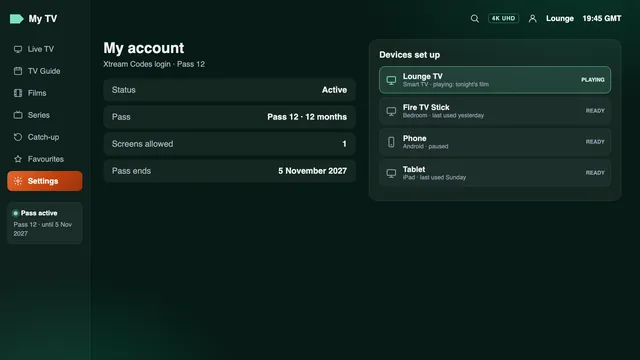
A pass lasts the number of months you bought, counted from the day you paid. Bought on 5 November 2026, Pass 3 would stop on 5 February 2027, Pass 12 and Pass 12 Duo on 5 November 2027, and Pass 24 on 5 November 2028. Most players repeat the date on their account screen.

When that day arrives, the login simply stops. Nothing is charged, there is no direct debit to cancel and no call to make. Should you want more, you order again, for the same length or a new one, and the team sends fresh details that go into the players you already have.

Place that order with the date in mind rather than after it has passed, so the gap does not fall on a big match night. The renewal guide covers the timing and what to change in each player.

Account screen of an IPTV player: Pass 12, end date and devices
A player’s account screen repeats the pass and the day it ends

Guarantee

The 7-day guarantee, and what it covers

For 7 days after payment, you can have your money back in two cases: the login never reached you, or nothing appears on any screen in your home even after the support team has gone through it with you.

The guarantee protects you against access that does not work; it is not a cooling-off for a change of heart. A login that played and was then abandoned is not covered, and nor is broadband too slow for 4K when the speed it needs was spelt out before you ordered. That is the reason we ask about your device and connection first.

The exact wording is in the refund policy, and the cancellation rights page sets out where you stand on digital content. Accepted refunds are paid back to whichever card or PayPal account was used.

Covered

  • Your login never arrived
  • No picture on any device at home, even with our help
  • You write within 7 days of paying

Not covered

  • You changed your mind after the login worked
  • Your line was too slow for 4K, as we had warned
  • The login was suspended for use outside your home

FAQ

Questions about the passes

Which of the IPTV subscription plans suits a first order?

Pass 12, for most homes: £49 for 12 months, around 13p a day. Unsure about your broadband or your TV? Pass 3 at £29 gives you 3 months to judge the picture at home before something longer.

Do the passes renew automatically?

No. You pay for each pass a single time and it ends on the date in your login message. No money leaves your account afterwards; to keep watching, you place a fresh order.

Is there a one-month pass?

No. The shortest is Pass 3: £29 for 3 months, or £9.67 a month. Longer passes lower the monthly figure to £4.08 with Pass 12 and £3.71 with Pass 24.

Can I use a one-screen pass on two TVs?

You can install the login on several devices at home, but just one of them can play at any moment. For two TVs running on the same evening, Pass 12 Duo allows two screens at once for £79.

Are the channels and picture the same in every pass?

Yes. The four IPTV subscription plans share the same 40,000+ channels, the same library of 120,000 titles and the same picture, reaching 4K where the source was produced in 4K. What changes is how long the pass runs and how many screens it allows.

What if the login does not arrive?

It usually comes within 2 minutes, whatever the hour. Look in your email’s spam folder and in the WhatsApp chat you ordered from, then message us. If it never reaches you, the 7-day guarantee pays you back.

Do I need to buy an app?

No. We neither publish nor sell an app. Most players are free from your device’s store; some offer optional paid features or a one-off activation, and those prices vary by store.

Customer reviews

What IPTV Subscription 4K customers tell us

Really good selection of UK and international channels. I particularly like the variety of sports, movies and entertainment available.

Oliver Bennett

The VOD library has plenty of films and TV series to choose from. Easy to browse and lots of different categories.

Sophie Williams

I use IPTV Smarters on my Fire Stick. The setup instructions are straightforward and the interface is easy to understand.

Daniel Thompson

A good variety of British and international entertainment. I especially like having movies and sports channels in one place.

Emily Harris

The selection of sports, documentaries and movies is impressive. There are plenty of categories to explore.

James Walker

I like the variety of content available, especially the films and series. The different categories make browsing straightforward.

Charlotte Evans

Four IPTV subscription plans, one payment and one end date each

Pick the length that suits your home, pay once and expect your login within 2 minutes. The date it stops is in writing from the first message, and the 7-day guarantee covers a login that never works.