See plans

Fixed-term passes for UK homes · paid once

IPTV Subscription, paid once, with the end date in writing

Here, a UK IPTV subscription takes the form of a pass. It opens 40,000+ live channels, with the British ones grouped at the top, plus 120,000 films and series, and the picture rises to 4K UHD wherever a programme was made in 4K. Pay £29 to £89 a single time, receive your login 2 minutes later and watch until the date printed in the message. Nothing renews by itself.

  • 7-day money-back guarantee
  • Login 2 minutes after payment, day or night
  • Nothing renews by itself
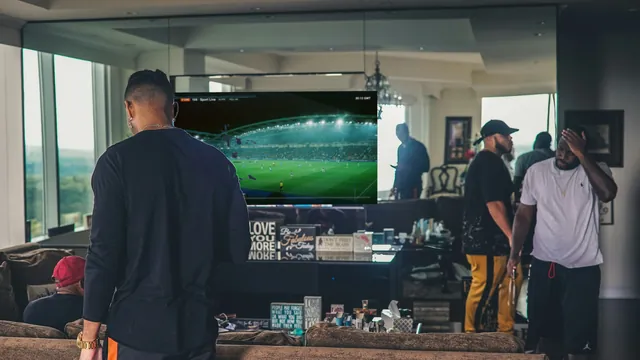
Friends in a loft watching a live match on a big TV through an IPTV player

No auto-renewalan end date in writing

Subscription passIS4-PASS12

Pass 1212 months · 1 screen

Starts5 Nov 2026
Ends5 Nov 2027
Per day
13p
Renews
only if you order again
Login sent
within 2 minutes

One payment£49Works out at£4.08/month

Order Pass 12

Players that read your login

IPTV Smarters ProTiviMateIBO PlayerSmart IPTVXP IPTVSmart STBHot PlayerVLCKodiFire TVAndroid TV

40,000+channels, sorted UK first
120,000on-demand titles
13pper day on Pass 12
2 minbetween payment and login

The basics

What is an IPTV subscription, and why sell it as a pass?

IPTV is short for internet protocol television. Instead of an aerial, a satellite dish or a cable box, the pictures reach your screen through the broadband line you already have. An IPTV subscription is the key to that: a login which a player app on your TV, stick, phone or laptop uses to pull in the channel list, the programme guide and the on-demand library.

Most sellers describe that access by the month. At IPTV Subscription 4K we describe it by its final day. A pass runs for a length you choose (three, twelve or twenty-four months) on one screen or two, and the day it finishes is spelt out in the message that delivers your login. You settle it in one go with debit or credit card or PayPal, and no mandate is left behind to collect money later.

Before you buy IPTV subscription access anywhere, it comes down to four plain questions. How long does it run? How many screens can play at the same moment? Which day does it stop? And what happens the morning after? Each answer is written on this page, starting with the passes below.

  • A login, not a box: your chosen player reads it
  • 40,000+ channels and 120,000 on-demand titles
  • One screen, or two at once with the Duo pass
  • A finishing date in the message, never a renewal date
  • Carrying on means a fresh order, placed by you
How a channel reaches your sofa
  1. Our servers

    When demand peaks in the evening, the load is spread over several servers, each sending channels as streams.

  2. Your broadband

    Each stream comes in through your router; plan on roughly 5 Mb/s for HD and 25 Mb/s for a 4K screen.

  3. Your player app

    TiviMate, IPTV Smarters Pro, IBO Player or a similar app reads the login and lays out the channels.

  4. Your screen

    The TV shows whatever the source carries: HD, Full HD, or 4K when it was produced that way.

Nobody comes round to install anything and nothing arrives by post: an app and a steady line do the work.

Passes

IPTV subscription UK prices: four passes, one payment each

Channels, library and picture quality do not change from one pass to another. What changes is the length, the number of screens and the daily cost, from 32p on Pass 3 to 12p on Pass 24.

Short pass

Pass 3: 3 months

Three months to get comfortable

£29.00

Works out at £9.67 each month

Three months, then decide

One screen playing at a time

  • Pictures in HD, Full HD and 4K where the source allows
  • Seven days of guide and catch-up
  • More than 40,000 live channels
  • Login by Xtream Codes or M3U link
  • A library of 120,000 films and series
  • WhatsApp and email help at any hour

Refund within 7 days if nothing plays

Order Pass 3

Paid once, never renews by itself

The pass most homes choose

Most chosen

Pass 12: 12 months

Twelve months, one payment

£49.00

Works out at £4.08 each month

Saves £67 on 4 × Pass 3

One screen playing at a time

  • Pictures in HD, Full HD and 4K where the source allows
  • Seven days of guide and catch-up
  • More than 40,000 live channels
  • Login by Xtream Codes or M3U link
  • A library of 120,000 films and series
  • WhatsApp and email help at any hour

Refund within 7 days if nothing plays

Choose Pass 12

Paid once, never renews by itself

Two TVs

Pass 12 Duo: 12 months, 2 screens

Two screens at once for a year

£79.00

Works out at £6.58 each month

Saves £153 on 8 × Pass 3

Two screens playing together

  • Pictures in HD, Full HD and 4K where the source allows
  • Seven days of guide and catch-up
  • More than 40,000 live channels
  • Login by Xtream Codes or M3U link
  • A library of 120,000 films and series
  • WhatsApp and email help at any hour

Refund within 7 days if nothing plays

Order Pass 12 Duo

Paid once, never renews by itself

Longest pass

Pass 24: 24 months

Two years at the lowest monthly cost

£89.00

Works out at £3.71 each month

Saves £143 on 8 × Pass 3

One screen playing at a time

  • Pictures in HD, Full HD and 4K where the source allows
  • Seven days of guide and catch-up
  • More than 40,000 live channels
  • Login by Xtream Codes or M3U link
  • A library of 120,000 films and series
  • WhatsApp and email help at any hour

Refund within 7 days if nothing plays

Order Pass 24

Paid once, never renews by itself

  • Pay by debit or credit card or PayPal
  • Login in 2 minutes
  • Money back within 7 days
  • Help 24/7 in English
IPTV subscription UK prices for the four passes, as checked on 5 November 2026
PassScreens at oncePaid onceWorks out atPer dayEnds if bought on 5 November 2026
Pass 31£29£9.67 a month32p5 February 2027
Pass 121£49£4.08 a month13p5 November 2027
Pass 12 Duo2£79£6.58 a month22p5 November 2027
Pass 241£89£3.71 a month12p5 November 2028

Pass 12 is the pass we steer most homes towards: £49 for 12 months, which works out at £4.08 a month or 13p a day, and £67 less than buying Pass 3 four times over. Whichever you pick, the IPTV subscription closes on the day written in your message and nothing further is taken.

Choosing

Which IPTV subscription pass suits your home?

Four common situations, and the pass that fits each of them.

One TV, most evenings

Pass 12: £49 once for 12 months, 13p a day. The length we suggest for a single TV, with one decision to make each year.

Starting short

Pass 3: £29 for 3 months. Long enough to get the app, the guide and the Wi-Fi sorted before you think about a year.

Two TVs busy at once

Pass 12 Duo: £79 for 12 months on two screens together, which is £3.29 a month for each one.

Set up and staying put

Pass 24: £89 for 24 months, the lowest monthly cost at £3.71, and £143 below eight Pass 3 orders.

Not sure? Start from the screens rather than the length. If two people never watch at the same moment, one screen at a time is enough, even when the login is entered on more than one TV in the house. Then pick the length by how settled your set-up is: a new stick and an untried Wi-Fi corner argue for three months, a set-up that already works argues for twelve or twenty-four.

Day by day

From payment to end date: one pass, step by step

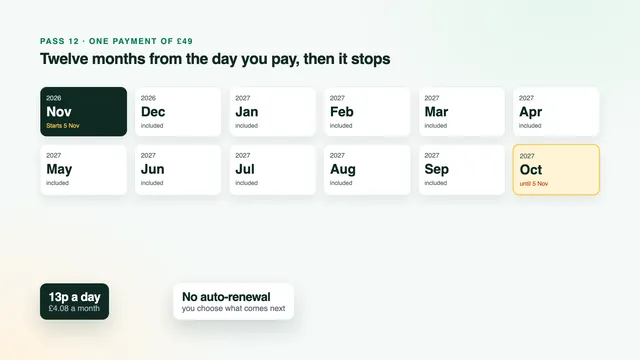
Follow a Pass 12 bought on 5 November 2026, the day this page was last checked. A different start date shifts the rows; the logic stays put. Searches for “IPTV subscription 12 months” or “12 months IPTV subscription” describe exactly this pass.

A Pass 12 bought on 5 November 2026
WhenWhat happensWhat you do
5 November 2026You pay £49, one time.Order from the pass card on WhatsApp; there is no contract to sign.
2 minutes laterYour login message lands by WhatsApp or email, with the finishing date in it.Keep it safe: everything the player asks for is inside.
That eveningThe player fills in the channel list, the week’s guide and the film library.Enter the login once, star a few favourites, check the guide shows the right hour.
28 March 2027Clocks go forward: GMT becomes BST.Guide an hour adrift? Nudge the EPG time offset in the player.
31 October 2027Clocks go back to GMT.Reset the offset if you changed it in spring.
The final weeksNo bill, no reminder, nothing to switch off.Decide whether you want another pass, and for how long.
5 November 2027The Pass 12 login stops working.Nothing to cancel. Order again only if you want more.

Two details matter before you order. The months are counted from the day you pay, not from the evening you first switch on, so buy when you are ready to watch. And the date belongs to the login rather than to a device: every screen signed in with it goes dark on the same day.

That is the real gap between a 12-month IPTV subscription paid once and a contract. A contract has a minimum term and then rolls on until you act. A pass has a last day and stops there unless you act.

How it works

Three steps from order to first channel

A UK IPTV subscription from us needs no engineer and no parcel: setting it up takes one message and one app.

  1. 01

    Pick a pass and pay once

    Choose the length and the number of screens, press the order button and pay with debit or credit card or PayPal. The figure on the card is the whole price, with no set-up fee and no hardware to rent.

  2. 02

    Open the login message

    It comes through on WhatsApp or by email 2 minutes after payment, at whatever hour. Inside: your username and password, the server address, an M3U link, a link for the TV guide and the date your pass ends.

  3. 03

    Enter it in your player

    In TiviMate, IPTV Smarters Pro, IBO Player or any compatible app, choose the Xtream Codes option and fill in the three fields. Channels and a week of listings then appear.

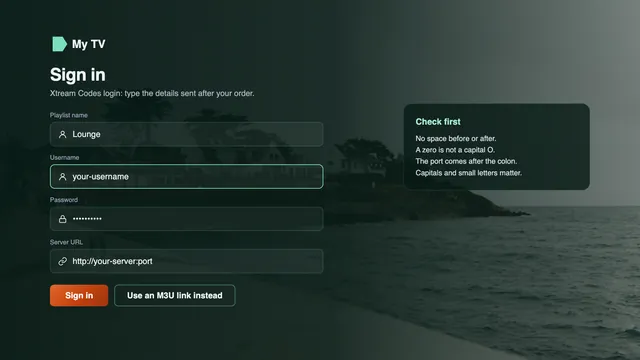
Xtream Codes login screen of an IPTV player: username, password and server address
Step three on screen: the three fields of an Xtream Codes login

Stuck on the third step? Message the team on WhatsApp or by email; someone answers 24/7, in English. Mention the device and the app, and they will guide you screen by screen.

Why a pass

Why homes pick a pass with an end date

An IPTV subscription sold as a pass changes one thing above all: you decide when it finishes, not a billing cycle.

The last day is known on day one

It is printed in your login message and shown on the player’s account screen. No renewal notice to look out for, no cancellation deadline to remember.

13p a day on Pass 12

£49 pays for 12 months on one screen: £4.08 a month. Across the year that is £67 below four back-to-back Pass 3 orders.

British channels at the top

The list opens on the UK groups (news, entertainment, sport, drama, films, kids, music, documentaries and regional) before any other country.

Picture by source

HD or Full HD on most of the list, and the full 3840 × 2160 where a channel or title was made in 4K. Live sport holds 50 frames a second whenever the feed does.

Your favourite app

The login runs in TiviMate, Smart IPTV, IPTV Smarters Pro, VLC, IBO Player, Kodi or XP IPTV. We make no app ourselves, so nothing ties you to one.

Answers in English

WhatsApp and email, 24/7, from the first login to the day you decide whether to go again.

Channels

40,000+ live channels, with the UK grouped first

Every IPTV subscription pass opens the same list, arranged country by country and, inside each country, by category. The UK comes first, so the channels you reach for most sit a few presses away.

News

Rolling British news and current affairs. Foreign news channels live under their own countries.

Entertainment

Prime-time shows, quizzes, reality and comedy: where most evenings begin.

Sport

Football, cricket, rugby, golf, tennis, darts, snooker, boxing and motor racing.

Drama and box sets

Channels built around drama, and around the box sets you follow week to week.

Films

Film channels sorted by genre, from this year’s releases to old favourites, alongside the on-demand library.

Kids

Separate groups for little ones and for older children, easy for a parent to find.

Music

Music video channels and radio-style music channels.

Documentaries

Wildlife, history, science and true crime.

Regional

Regional versions of the main UK channels, with local news and programmes.

Europe

European countries each have their own folder, many with separate news and sport groups.

Further afield

The rest of the world follows the same pattern: country first, category second.

A second language at home

Households that watch in another language find that country’s channels in the same list, without a second login.

Search across the lot

Most players search every country at once, so typing a channel name once finds it wherever it is filed.

Order beats size

With 40,000+ channels, the order matters more than the number. The UK groups come first, then the countries.

Favourites on top

Star the channels you really watch; most players keep a favourites group above everything else.

Quality badges

HD, FHD and 4K badges tell you what each stream carries, as decided by its source.

A living list

Channels come and go with their sources, and the player picks up changes each time it reloads the login.

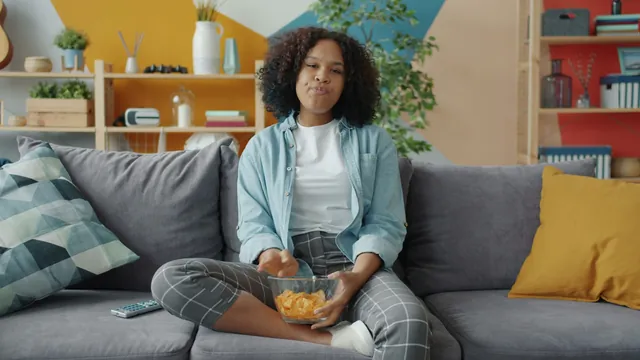
Woman on a colourful sofa with a bowl of popcorn and the remote, ready to browse the channelsBritish channels first

We list categories here rather than channel names. If one particular channel decides it for you, ask the team before ordering and they will tell you which group it is filed under.

On demand

120,000 films and series, ready when you are

The library comes with your IPTV subscription at no extra charge: 120,000 titles, arranged so that Friday night starts with a film rather than twenty minutes of scrolling.

Films by genre and year

Browse by genre, by year or by what was added last, and start whenever it suits. Most players pick up where you paused.

Series by season

Each season sits together, episode after episode, so a box set never waits for a broadcast slot.

English first

Most titles are in English. The rest carry subtitles, which you turn on or off from the player’s audio and subtitle menu.

4K where it was shot in 4K

Titles produced in 4K play at 3840 × 2160 on a 4K set. HDR formats and Dolby Atmos show up only if the title carries them and your TV and app can handle them.

Two friends laughing on an orange sofa during a film nightFilm night, no rental fee

Guide and catch-up

Seven days of listings on UK time, plus catch-up

The programme guide (EPG) arrives with your Xtream Codes login: a week of listings for each channel, set to UK time. Choose a programme to read about it, set a reminder where the app allows, or jump to the channel. Every IPTV subscription we sell carries the same guide.

Britain keeps GMT through the winter and switches to BST, an hour ahead, between the last Sundays of March and October. On 5 November 2026 the country is on GMT. A Pass 12 bought that day sees both switches: forward on 28 March 2027, back on 31 October 2027.

Should the listings look an hour early or late after a switch, the fix sits in the app, not in your pass. Find the EPG time offset in its settings (a few apps call it timeshift) and shift it by one hour.

Catch-up covers the channels that support it, generally reaching back seven days. A little clock or arrow next to a programme in the guide means you can replay it, and some apps add a Catch up menu that sorts replays by channel.

  • A week of listings, channel by channel
  • GMT in winter, BST from late March
  • One setting cures a one-hour gap
  • Replays up to a week back where offered
  • Clock or arrow icon: you can replay it
Couple laughing on the sofa while they pick a programme to catch up onReplays up to a week back

Sport

Live sport: smooth 50 fps when the feed has it

Football, cricket, rugby, golf, tennis, darts, snooker, boxing and motor racing all have a place in the UK sport group, and in the sport folders of other countries.

Motion that keeps up

A match shot at 50 frames a second carries twice the images of one at 25, so a cross-field ball or a hard-hit return stays sharp. When the feed has those 50, your stream keeps them.

A short delay

Your live picture can lag the broadcast by several seconds, sometimes up to about thirty. Silence the group chat during a match if you would rather not hear the score early.

Match nights are busy nights

Roughly 19:00 to 23:00 is when most of the country is streaming, and Saturdays and big fixtures push it hardest. A TV on a cable copes far better than one on crowded 2.4 GHz Wi-Fi.

Settings for smooth motion

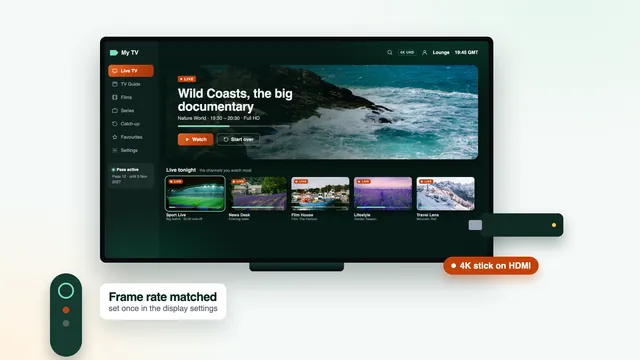
Apple TV owners: under Settings › Video and Audio › Match Content, enable Match Frame Rate first, then Match Dynamic Range. Elsewhere, pick hardware decoding in the app.

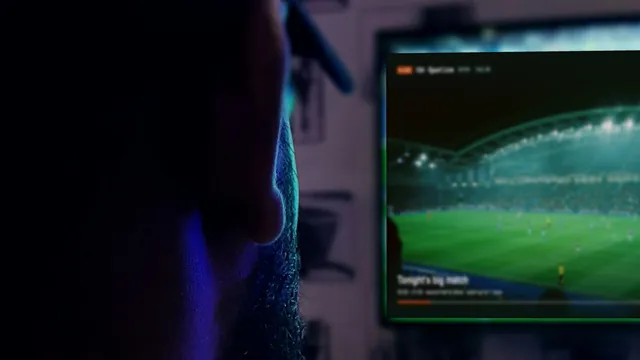
Viewer in a dark room watching a live match on the TV through an IPTV player50 fps when the feed has it

No IPTV subscription can turn a 25 fps source into a 50 fps one, which is why we only promise 50 where the source carries it.

Picture

HD, Full HD and up to 4K UHD: what sets your picture

The 4K in our name means up to 4K, on channels and titles produced in 4K. The picture an IPTV subscription can show you depends on four things.

The source

A channel or film arrives in the quality it was made in. A programme filmed in HD stays HD, whatever the screen.

A 4K screen and port

A 4K television, or a 4K stick or box, in an HDMI port rated 2.0 or later, with a cable of the same standard.

Hardware decoding

The player must decode HEVC, also called H.265, in hardware. Software decoding stutters on 4K, however fast the line.

Around 25 Mb/s

For each 4K screen, steady, measured on the device itself rather than on a phone nearby.

HDR10, HDR10+ and Dolby Vision, like Dolby Atmos sound, follow the same logic: you get them when the source has them and both the app and the TV can handle them. Dolby Vision is a strength of LG’s OLED and QNED ranges; Samsung sets use HDR10+ instead and skip Dolby Vision. A Fire TV Cube, a Fire TV Stick 4K Max or a Stick 4K will pass on 4K HDR and Atmos when the programme carries them.

Miss one of the four and nothing breaks: the app simply shows the best picture your set-up can manage, usually Full HD.

Devices

Devices and players that read your login

Your IPTV subscription is a login, so it goes wherever a compatible player goes. Here is what runs where; we publish and sell no app of our own.

Amazon Fire TV

You won’t find IPTV Smarters Pro in the Amazon Appstore. Get Downloader, by AFTVnews, from the Appstore, then give it permission to install unknown apps: the switch lives in Developer options, under Settings › My Fire TV. No Developer options? Open About on the same menu and select the device’s name seven times in a row. The download link arrives with your login. Amazon’s newest sticks may run Vega OS, which accepts apps from the Appstore only, so check the model number before you buy.

Samsung and LG TVs

Whether Smarters Pro is offered depends on the model and the country. Smart IPTV asks for a single activation per TV, after which you send the playlist from its website using the set’s MAC address. IBO Player ties your playlist to the MAC address or a device key. Both read the same access; if neither suits, plug a streaming stick or an Android box into HDMI.

Android TV and Google TV

Google Play on the TV itself supplies the players, among them TiviMate (free to install, with paid premium options), XP IPTV and IPTV Smarters Pro. Stay with the store versions, because APK files handed round on forums can hide malware.

Apple TV, iPhone and iPad

Apple devices install players from the App Store and nowhere else; Smarters Pro and VLC were both listed there when this page was checked. You can mirror an iPhone with AirPlay, but an app running on the Apple TV itself holds the picture better.

PC and Mac

VLC, VideoLAN’s free player, opens the M3U link on Windows and macOS, and Smarters Pro runs on Macs with Apple silicon. Kodi joins in once you enable its PVR IPTV Simple Client add-on.

Phones and tablets

Smarters Pro, published by Tech Smarters Private Limited, is free on iPhone, iPad and Android, with an optional in-app Premium priced differently by store. Copycat apps with almost identical names exist; the developer’s name tells them apart.

Which app on which screen
Checked at the time of writing; availability and prices vary by store
ScreenApp to try firstLogin typePicture notes
Fire TV Cube, Stick 4K Max, Stick 4KTiviMate, or Smarters Pro through DownloaderXtream Codes4K HDR and Atmos when the programme has them
Samsung (Tizen)IBO Player, Smart IPTV; Smarters Pro on some setsPlaylist tied to the MAC address, or XtreamHDR10+; no Dolby Vision
LG (webOS)IBO Player, Smart IPTV; Smarters Pro on some setsPlaylist tied to the MAC address, or XtreamDolby Vision on OLED and QNED
Android TV, Google TV, Android boxXP IPTV, TiviMate or Smarters ProXtream Codes4K on a 4K panel with HEVC in hardware
Apple TVVLC or Smarters ProM3U or Xtream CodesMatch Content: frame rate and dynamic range on
Windows PC or MacVLC, Kodi, or Smarters Pro on Apple siliconM3U, or Xtream in Smarters ProDepends on the monitor and its decoder

Broadband

Broadband: the speed each screen needs

An IPTV subscription is only as steady as the line carrying it. Steadiness matters more than the headline figure, so run your speed check on the TV or stick at around 9 pm, not on a phone sitting next to the router.

HDaround 5 Mb/s

Plenty for news, children’s channels and older programmes; the safe choice on patchy Wi-Fi.

Full HDaround 10 Mb/s

The sharpest picture most British channels broadcast; a steady 10 per screen keeps it clean.

4K UHDaround 25 Mb/s

For each 4K screen, steady, alongside a 4K television plugged into HDMI 2.0 or newer, and HEVC decoded in hardware.

Two 4K screens (Pass 12 Duo)around 50 Mb/s

Screens add up: two 4K streams at the same moment need double the line.

Steady speed per screen, measured on the TV or stick
PictureOne screenTwo screens with Pass 12 DuoBest connection
HD5 Mb/s10 Mb/sEthernet, or 5 GHz Wi-Fi
Full HD10 Mb/s20 Mb/sEthernet, or 5 GHz Wi-Fi close by
4K UHD25 Mb/s50 Mb/sEthernet first; 5 GHz Wi-Fi only within the router’s room

A cable wins

Run Ethernet from the router to the TV if you can. Plenty of TVs have a 100 Mb/s network socket, which is still four 4K streams’ worth.

5 GHz, short range

The 2.4 GHz band is jammed in flats and terraced streets. Join the TV to the 5 GHz network and keep it within a room or so of the router.

Router a long way off?

Powerline adapters send the connection along the household wiring; a mesh kit puts extra Wi-Fi points around the house. Either helps a TV two floors up.

Restart, then write

The player’s buffer soaks up brief drops. When the picture freezes, restart the router and the app first, then tell support which device it was and at what time.

Two TVs

Pass 12 Duo: two screens at the same time

Pass 12 Duo is the only IPTV subscription in our range that plays on two screens in one home at the same moment, for 12 months. It costs £79 once, or £6.58 a month, which comes to £3.29 for each screen; buying Pass 12 twice would cost £98.

Who it suits

A lounge TV and a bedroom TV, a match in one room while a film plays in the other, or two people who rarely agree on the evening’s viewing.

Broadband for two

Add the figures together: two Full HD screens want about 20 Mb/s between them, two 4K screens about 50, steady, measured on each device.

One message, two apps

Enter the same login in each app. A third screen at the same moment is not part of any pass, and no three- or four-screen pass exists.

Same roof

Both screens belong to one household. Should the login turn up in another home or on a public page, it can be suspended.

Order Pass 12 Duo

2 screens at once · 12 months · £79 paid once · 22p a day for both

Compare

IPTV subscription pass or pay-TV contract: how they compare

Three ways to pay for television in a British home, side by side: a pay-TV contract, offers seen online and an IPTV subscription UK households pay once, with the figures as they stood when this page was checked.

A typical pay-TV contract

  • Satellite or cable with sport and films: often £60 a month or more
  • A minimum term of 18 or 24 months
  • Billed monthly, usually by direct debit
  • Equipment fitted in your home
  • Rolls on until you ask to leave

Monthly and “lifetime” offers seen online

  • A single month: £10.99 to £22
  • Twelve such months: roughly £132 to £264
  • “Lifetime”: no end date, no guarantee in writing
  • Terms that vary from one seller to another

A pass from IPTV Subscription 4K

  • £49 paid once covers 12 months (£4.08 a month)
  • The finishing date printed in your login message
  • No direct debit and no automatic renewal
  • Nothing to fit, apart from a player app
  • 7-day guarantee when nothing will display despite our help
Pay-TV and market prices at the time of writing; prices vary by seller
Pay-TV contractMonthly offers online“Lifetime” offers onlinePass 12
Cost of a year£720 or moreroughly £132 to £264Varies; no year to measure£49
Commitment18 or 24 monthsA month at a timeNot stated12 months
Last day in writingEnd of the minimum termDepends on the sellerNoneYes, in the login message
AfterwardsContinues until you cancelDepends on the sellerNothing promisedStops, unless you order again

Twelve-month offers seen online on 5 November 2026 ran from about £40 to £65, clustering near £55, while two screens for a year cost roughly £96 to £100. At £49 for 12 months and £79 for two screens, our passes sit in the lower half of those ranges, with the last day written down.

A “lifetime” IPTV subscription sounds like the end of renewals. Look at what it actually commits to: no end date also means no date the seller stands behind, and none of the offers we looked at put a guarantee in writing. A pass swaps that open-ended promise for a short one you can check.

For a household paying for a large satellite or cable bundle, the sums are stark: £720 or more a year against £49 for an IPTV subscription pass. The trade-off is that you bring the app, the device and a steady line yourselves.

Cheap IPTV subscription headlines usually quote the price of the shortest stretch on offer. Before comparing, turn every deal into a cost per month of viewing: the cheapest IPTV subscription on a banner can work out dearer than a year paid in one go, and an offer without an end date cannot be turned into a monthly figure at all.

Delivery

The login message: what arrives and where each line goes

A single message reaches you on WhatsApp or by email 2 minutes after payment, whatever the hour. That message is your whole UK IPTV subscription: there is no box, no card and no app to buy from us.

Username, password, server URL. Together these form the Xtream Codes login, the option to choose in TiviMate, IBO Player, XP IPTV or IPTV Smarters Pro. One login brings channels, guide and library together.

M3U playlist link. One web address listing every stream, for VLC, Kodi, Smart IPTV and apps without an Xtream option.

XMLTV guide link. Paste it into an M3U app so a week of listings sits next to the channels.

End date. The day the pass stops. Keep the message: it doubles as your receipt and your reminder.

Copy each detail character for character, including http:// and the port number after the colon. When a login is refused, the culprit is nearly always a missing character, a stray space or a phone keyboard that capitalised the first letter.

What arrives 2 minutes after you pay

Login name
pass-•••••
Secret code
••••••••
Server address
http://your-server:port
M3U link
…/get.php?…type=m3u_plus
Guide (XMLTV)
…/xmltv.php?…
Pass ends
date written in the message

Shown blurred here: your own details come in the message itself.

The last day

The end date, and renewing on purpose

What happens on the last day, and how to carry on without losing an evening of television.

On the date in your message the pass simply stops. No charge follows, nothing rolls into another month, and there is nothing to cancel, because nothing was ever set to continue.

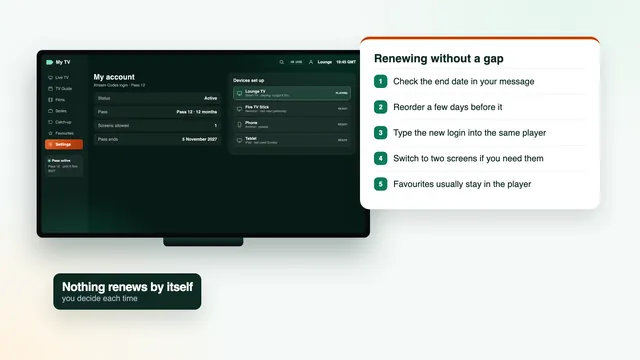
An IPTV subscription that renews by itself is convenient right up to the month you forget it exists. Ours asks you to choose. To keep watching, you place a new order on purpose, in four short steps:

  1. 01

    Look up the date

    It is in your login message and, in most apps, on the account screen.

  2. 02

    Choose the next pass

    The same length or a different one, one screen or two, at the prices shown here on the day you order.

  3. 03

    Order on WhatsApp

    Press the order button of the pass you want and pay once with debit or credit card or PayPal.

  4. 04

    Enter the new login

    You receive fresh login details with their own end date. Type them into the apps you already use; nothing needs reinstalling.

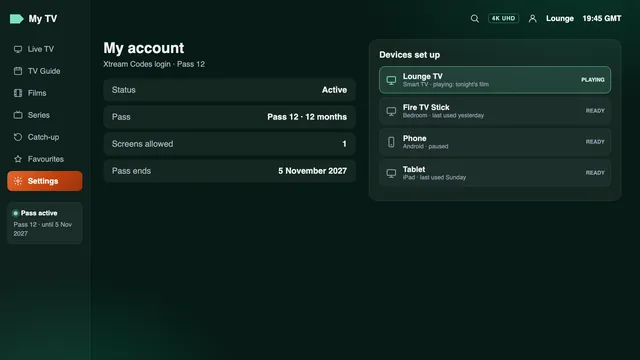
Account screen of an IPTV player: Pass 12, end date and devices
A player’s account screen, showing the pass and its end date

Order a few days early if a big match falls close to your end date, so the new login is entered and checked before the old one stops. The new message states its own dates, just like the first one.

Commitments

Our commitments, in writing

Whoever you buy IPTV subscription access from, you are trusting a seller you cannot visit, so here is what we put in writing.

Your login in 2 minutes

Day or night, on WhatsApp or by email, as soon as the payment goes through.

A finishing date you can read

Written into the message: no renewal, no direct debit, nothing to remember to cancel.

7-day money-back guarantee

You are refunded within 7 days if no login ever reached you, or if the screen stays blank even after the team has worked through it with you. A change of heart is not covered, and nor is broadband that cannot carry 4K when we set out the speed before you paid.

Help around the clock

In English, by WhatsApp or email, 24/7, from the first set-up to the pass’s final day.

One home per pass

Each pass belongs to one household. A login that turns up in another home, or on a public page, can be suspended.

No promise we cannot keep

We won’t claim that everything is in 4K, or that a given programme will be. The picture follows each source, and this page says so wherever it counts.

Reviews

What buyers say about their pass

Really good selection of UK and international channels. I particularly like the variety of sports, movies and entertainment available.

Oliver Bennett

The VOD library has plenty of films and TV series to choose from. Easy to browse and lots of different categories.

Sophie Williams

I use IPTV Smarters on my Fire Stick. The setup instructions are straightforward and the interface is easy to understand.

Daniel Thompson

A good variety of British and international entertainment. I especially like having movies and sports channels in one place.

Emily Harris

The selection of sports, documentaries and movies is impressive. There are plenty of categories to explore.

James Walker

I like the variety of content available, especially the films and series. The different categories make browsing straightforward.

Charlotte Evans

FAQ

IPTV subscription questions, answered

What exactly comes with an IPTV subscription here?

A login for 40,000+ live channels and 120,000 films and series, with a week of listings and catch-up on channels that support it. It runs in the app of your choice for the length of your pass, on one screen, or two with Pass 12 Duo. The finishing date is written in the message that brings the login.

How much does an IPTV subscription cost?

Pass 3 costs £29 for 3 months, Pass 12 £49 for 12 months, Pass 12 Duo £79 for 12 months on two screens, and Pass 24 £89 for 24 months. You pay each one a single time. Monthly, that comes to between £3.71 and £9.67.

Does the pass renew on its own?

No. Nothing is set up to charge you again and there is no direct debit. The login stops on the date in your message; if you want more, you place another order.

How long until my login comes through?

It is sent within 2 minutes, day or night, on WhatsApp or by email. If nothing has appeared by then, look in your spam folder before contacting the team.

Which is the best IPTV subscription UK homes can choose?

The best IPTV subscription for your home is the one whose terms you can check before paying: a written end date, a refund rule with a number of days, the price worked out per month and a quick answer to a question asked before the sale. Lists titled “best IPTV subscription 2026” rarely show those checks; every pass on this page states them.

Which pass should I choose?

For a single TV we suggest Pass 12: £49 for a year, 13p a day. Pass 3 suits a first order if you prefer to start short, and Pass 24 has the lowest monthly cost, £3.71. Pick Pass 12 Duo only when two screens will play at the same time.

Can two TVs play at once?

Yes, with Pass 12 Duo: two screens in the same household at the same moment, £79 for 12 months. The other three passes play on one screen at a time.

Which devices work?

Fire TV, Android TV and Google TV, Apple TV, iPhone and iPad, Samsung and LG smart TVs, Android boxes, Windows PCs and Macs. Each one needs a player app, for example TiviMate, IPTV Smarters Pro, Smart IPTV, IBO Player, VLC, XP IPTV or Kodi.

Is everything in 4K?

No, and we do not claim it is. Channels and titles produced in 4K reach 4K UHD; everything else plays in HD or Full HD, the way its source was made. For 4K you also need a 4K screen, HDMI 2.0 or later, hardware HEVC decoding and around 25 Mb/s.

How fast does my broadband need to be?

HD wants around 5 Mb/s, Full HD around 10 and each 4K screen around 25, steady, measured on the TV or stick. Two screens at the same time need double. Ethernet, or 5 GHz Wi-Fi near the router, keeps evenings smooth.

Why does the guide show the wrong hour?

Most likely the clocks have changed: the UK moves to BST on the last Sunday in March and returns to GMT on the last Sunday in October. In the app’s settings, shift the EPG time offset (or timeshift) by one hour.

How do I watch catch-up?

On channels that support it, programmes from up to a week back can be replayed. Look for the little clock or arrow beside a programme in the guide, or open the app’s Catch up menu.

What happens when my IPTV subscription ends?

The login stops on the end date and nothing is charged. To carry on, order a new pass: fresh login details arrive, and you type them into the apps you already use.

Can I have my money back?

Yes, within 7 days, if no login reached you or if the screen stays blank even with help from the support team. It does not apply if you simply change your mind, or if your broadband cannot carry 4K after we told you the speed it needed.

Can relatives in another house use my login?

No. Each pass is for one household, and a login found in another home or on a public page can be suspended.

Does an IPTV subscription include the player app?

No, we supply the access only. Player apps come from your device’s store: some are free, some charge for extras or an activation, and prices vary by store.

One payment, one end date, your login in 2 minutes

Pass 12: £49 for 12 months, 13p a day, paid once. An IPTV subscription bought on 5 November 2026 ends on 5 November 2027, and it renews only if you order again.

Pass 12: £4912 months · £4.08 a month

Order