Guide
IPTV subscription reviews: how to read them before choosing a pass
IPTV subscription reviews are worth reading before you choose a pass, provided you know which ones carry real information and which checks they can never do for you. Below: where buyers' comments live, how to tell useful ones from paid or copied ones, how to read a complaint, and the checks to make yourself.
IPTV subscription reviews: what they can and cannot tell you
A review is a report from one home: one broadband line, one set of devices, a few weeks of evenings. It can show how a seller behaved when something went wrong, whether the login arrived when promised and whether the picture held on a busy night. It cannot show how the same access will behave on your TV, in your rooms, on your line.
Reviews also age quickly. Players are updated, sellers change their prices and set-up, and a comment written two winters ago may describe something that no longer exists. Treat each one as evidence about a moment, then weigh it against the checks further down.
What reviews are good at
- how long delivery took after payment, and by which route;
- how support replied to a real problem: speed, tone and whether the fix worked;
- how the seller handled the end date, a renewal or a refund request;
- whether the picture held up on busy evenings, on a device the reviewer names.
They are poor at predicting your own picture, your broadband or how well stocked the categories you watch are.
Where buyers' reviews live
IPTV subscription reviews are spread across several kinds of site, each with its own habits. Reading two or three side by side gives a fairer view than any one alone.
| Where | What you usually find | What to look at first |
|---|---|---|
| Google reviews | Short comments on a seller’s business listing, with stars and sometimes a reply from the owner | The dates, and the reviewer’s other reviews: dozens posted in the same week deserve a second look |
| Trustpilot | Longer reviews, company replies and labels showing which reviews followed an invitation | Whether the company answers its poor reviews, and how |
| Threads where people ask about devices, players and set-up problems | Account age and history; a stranger recommending a seller by private message is advertising | |
| Forums | Long threads where the same buyers return weeks later | Later posts by the same person, which show whether a fix lasted |
| Video channels | Set-up walk-throughs, first impressions and comments under the video | Discount codes, links in the description and any sponsored or paid-promotion label |
Review sites with stars
The star average is the least useful number on the page. A seller with a handful of detailed, mixed reviews may tell you more than one with hundreds of one-liners. Sort by newest rather than most relevant, and read the low and middle scores first: that is where the detail usually sits.
A label showing that a review followed an invitation is normal, but it means the seller chose whom to ask. Reviews written without one, and the seller’s replies to them, are often more revealing.
Discussion threads and videos
On Reddit and forums, the useful material is rarely a verdict. It is the thread where someone describes a stick that would not install a player, or a TV guide that went an hour out when the clocks changed, then comes back to say what fixed it. Search a thread for your own device before reading the opinions.
Video channels are good for seeing a player’s menus before you install it. As a judgement of a seller they are weaker: many are filmed on the first day, and some earn a commission on every sale made through a link or a code in the description.
Signs of a useful review
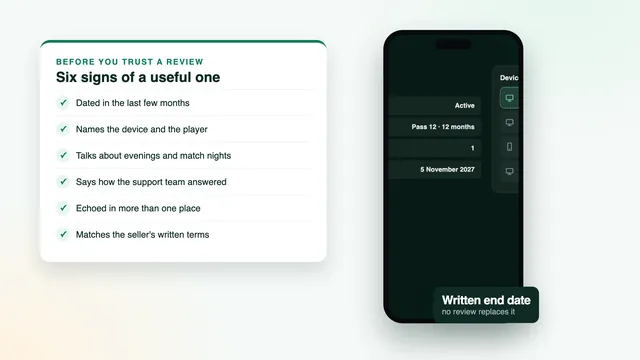
None of these features proves a review is genuine, but the more of them it has, the more weight it deserves.
- It is recent. Written in the last few months, ideally after several weeks of use rather than on the first evening.
- It names a device. A Samsung or LG set, a Fire TV stick, an Android box, an iPhone: you can tell at once whether it applies to you.
- It names an evening. A Saturday match, a weekday at 9pm, the week the clocks went back. Afternoons say little, because British homes load their lines most between about seven and eleven at night.
- It says how support answered. How long the reply took, whether it came in clear English and whether the fix worked.
- It mentions the connection. Ethernet, Wi-Fi in the same room or Wi-Fi two floors up changes what a buffering complaint means.
- It admits a snag. Real use nearly always produces one small problem, and an honest buyer mentions it.
- It has been updated. A second post a few months later, or after a renewal, is worth more than the first.
A review that ticks most of these boxes and matches your own set-up is worth more than a page of scores. If you watch on a stick, the Fire TV stick guide lists the models and settings worth comparing with what a reviewer describes; on a television, the Smart TV guide does the same.
Signs of a paid, copied or empty review
Paid and invented reviews tend to resemble each other, because they are written to a pattern. Look for several of these together rather than one on its own:
- a burst of five-star reviews within a few days, after months of silence;
- reviewer profiles with a single review, or with reviews of unrelated businesses in several countries in the same week;
- the same phrases, or the same odd spelling, under different names, or the same text on two review sites;
- nothing but superlatives: no device, no date, no problem, no detail a buyer would notice;
- claims nobody can honestly make, such as every channel in 4K or no buffering, ever;
- a discount code, a link or an invitation to send a private message inside the review;
- a price or a plan that the seller’s own site does not show.
The pattern also runs the other way. A cluster of one-star posts with no detail, all from the same week, can be a rival’s work rather than buyers' experience. Detail and dates count for more than stars in both directions.
How to read the bad reviews
Complaints are often the most useful reviews of all, once you work out what each one is really about. Most fall into one of four groups.
Problems in the home
Buffering on Wi-Fi two rooms from the router, a picture that drops only on match nights, a stick that cannot install players from outside its store: these describe the set-up more than the seller. Some recent Amazon sticks run Vega OS, for instance, and cannot install apps from outside the Appstore whatever access you buy.
Problems with a player
A guide that is an hour out after the clocks change is a player setting, corrected with the EPG time offset. A look-alike app with a near-identical name is a download mistake, avoided by checking the developer’s name. Read these complaints for the fix.
Problems with the seller
No reply for days, a login that never arrived, a refund refused although the written rule allowed it, a payment taken again without anyone asking: these are the complaints that matter. One can be an accident. Several describing the same thing, in different months, are a pattern.
The seller’s reply
Read the answer as carefully as the complaint. A reply that asks for the order details and offers a specific fix is a good sign. One that blames the buyer, pastes the same text under every complaint, or never comes at all shows how your own problem would be handled.
Checks no review can replace
Whatever the reviews say, a few things can only be confirmed on the seller’s own pages and in your own messages. They take ten minutes and settle the questions reviews leave open.
| Check | What to look for | How IPTV Subscription 4K answers it |
|---|---|---|
| A written end date | The day your access stops, in writing, in the message with your login | Written in the login message; access stops that day and nothing renews by itself |
| The refund rule | The number of days and exactly what it covers, readable before you pay | 7 days, in two cases: no login received, or no picture even after the support team has helped |
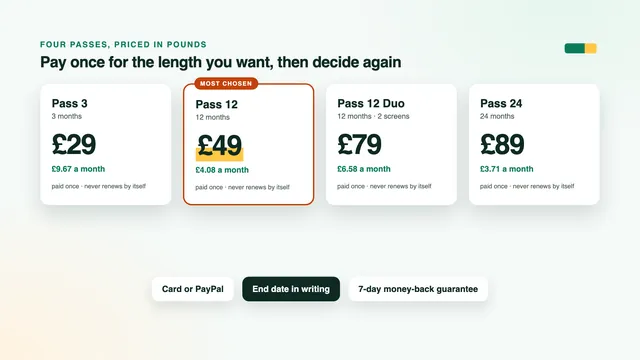
| The price per month | The pass price divided by its months, compared like for like | From £3.71 a month on Pass 24 to £9.67 on Pass 3 |
| A pre-sale question | A quick, specific reply in clear English before you have paid | Support replies in English, on WhatsApp or email, 24/7 |
| How you pay | One payment, with no direct debit set up for later | A single payment (debit or credit card or PayPal); nothing renews automatically |
The written end date
Ask when the access stops before you pay, then check that the date appears in the message that brings your login. A pass with a written end date can be planned around. A lifetime offer has no end date and no written guarantee, so even a glowing review of one describes the past, not next year.
The refund rule
Read the rule itself, not a reviewer’s summary of it: the number of days, what it covers and what it leaves out. Ours lasts 7 days and applies when the login message never reaches you, or when no channel will play even with the support team’s help; a change of heart is not covered. The full wording is in the refund policy.
The price per month
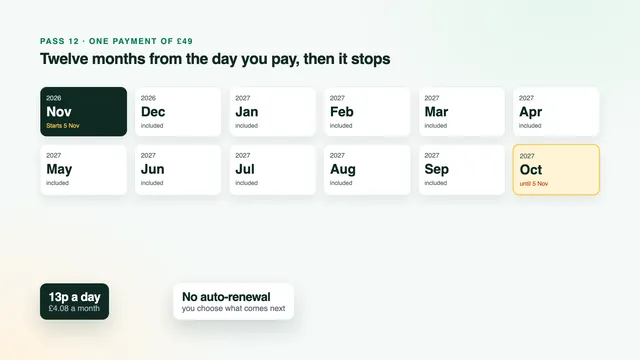
Divide the price by the number of months. At the time of writing, year-long passes seen on offers online cost between about £45 and £65, with a median near £55, while a single month on its own runs from £10.99 to £22. A review that praises a price tells you nothing until that division is done. The price guide works through the sums, and the 12-month guide shows how a year-long pass is counted from the day of payment.
A question before you pay
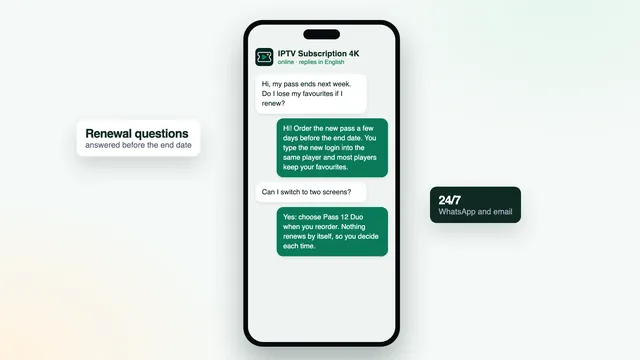
Send one specific question before you order: which player suits your TV model, whether your measured speed is enough for Full HD in a second room, or what happens on the end date. How fast, how clear and how relevant the answer is gives you a small sample of the support you would get later, which no review can hand you. You can send the team a question on WhatsApp or by email before choosing anything.
A ten-minute routine before you choose a pass
Put the reviews and your own checks together in one short sitting, in this order:
- Read the newest reviews on two different sites, starting with the low and middle scores.
- Set aside any that mention neither a device nor an evening; for the rest, note how support answered.
- Look for patterns: the same complaint about delivery, replies or refunds in different months.
- Read the refund rule, and check that the end date is written in the login message.
- Work out the price per month for the length you want.
- Send one question and see what comes back, and how quickly.
- Pick a length you are comfortable with: a shorter pass commits less while you form your own view.
The last step matters more than it looks. Pass 3 runs for three months at £29 and is the smallest commitment if the reviews left you unsure. Pass 12 (£4.08 monthly) or Pass 24 (£3.71 monthly) suits you once you know the picture holds in your home. Every pass carries the same channels and library, and the plans page sets out how the four differ.
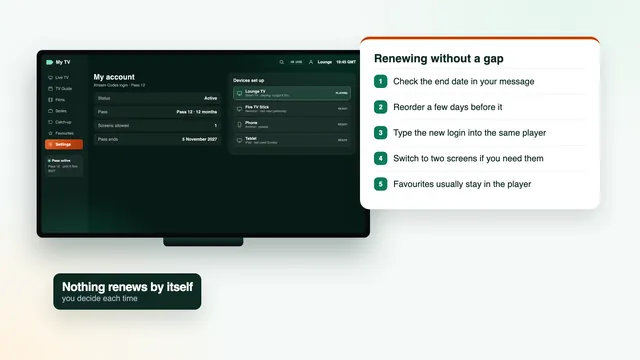
Reviewers rarely say how many people were watching at once. If two of you will often watch different things on the same evening, read how screens work across several rooms before choosing, and the renewal guide for what happens when a pass ends.
Your own first week is the review that counts
Once you have a pass, your own first week matters more than any IPTV subscription reviews you read beforehand. The first 7 days are also the refund window, so use them to check what matters in your home:
- Type the login into the main TV with the IPTV subscription setup steps, then open a few channels in each category you watch.
- Watch on at least one busy evening, ideally during a live match.
- Open the TV guide and check that the times match UK time; set the EPG time offset if they are an hour out.
- Open catch-up on a channel that offers it, and start a film from the library.
- If something will not display, contact support straight away rather than on the last day.
That way any problem reaches the team while the refund rule still applies, and you judge the pass on your line and your devices rather than on a stranger’s. To see what an IPTV subscription from us includes, or to go straight to the four passes and their prices, start from the home page.
Frequently asked questions
Where do I find IPTV subscription reviews?
Google reviews on a seller’s business listing, Trustpilot, Reddit threads, forums and video channels are the usual places. Read at least two of them side by side, because each attracts a different kind of buyer and a different kind of post.
Are star averages worth trusting?
On their own, not much. An average hides the detail you need, and a burst of posts can move it within days. Read the newest low and middle scores first, and keep the reviews that name a device, an evening and a support reply.
How recent should a review be?
A few months old at most, ideally. Players, prices and set-ups change, so an older review may describe something that no longer exists. A review updated after several weeks, or after a renewal, is worth more than one written on the first night.
Should I trust a video review?
Use it to see a player’s menus and how a login is typed in. To judge a seller, look for discount codes, links in the description and any paid-promotion label, and read the comments under the video, which are often more candid than the video itself.
Why does a review mention a price the seller’s site doesn’t show?
It may be an old price, an offer that has ended or a review of a different seller altogether. Go by the price on the seller’s own page on the day you order, and work it out per month before comparing.
What if every review I find is positive?
Be more careful, not less. Real buyers have different devices, lines and evenings, so a spread of opinions is normal. Check the dates and the reviewers' profiles, then rely on what you can confirm yourself: the end date, the refund rule, the price per month and a reply to your own question.